
Designing CRM screen-pop when customer identity is uncertain
Prevent wrong-customer screen-pops by separating candidate lookup, identity verification and record access, with synthetic examples and an interaction-context checklist.
- Published
The short answer
Treat a caller number as a lookup hint, not a verified customer identity. Find only candidates the current agent is permitted to access, preserve ambiguity and use a safe manual path when identity is missing or uncertain. Before opening a record, check that the result still belongs to the active interaction, the agent remains authorised, and your organisation's verification and disclosure policy has been satisfied. A single number match is not proof of identity; a late response must never replace another interaction's customer context.
Separate lookup, identity verification and permission
A screen-pop brings relevant CRM context into an agent's workspace. The risk is not just an inconvenient tab: a wrong-customer view can expose information, attach notes to the wrong record or influence what an agent discloses. Design the workflow around three separate decisions rather than treating a successful search as all three.
- Candidate lookup: which records might relate to this interaction, using permitted signals and the current access context?
- Identity verification: what evidence does the organisation require before treating this caller as a particular customer or authorised representative?
- Authorisation: may this agent access this record and these fields, and what information or actions may be offered to this caller at this stage?
These decisions are related but not interchangeable. One CRM record matching a number does not authenticate the caller. An agent's ability to view a record does not authorise disclosing its contents to whoever is on the line. Ofcom explains that caller ID can be changed through number spoofing; treat a displayed number accordingly, even if it looks familiar. [1]
Define the pre-verification boundary with the responsible privacy/security owners. Some workflows may permit an agent to see a restricted candidate summary; others may permit no customer details until verification. The conservative illustrative flow below opens the selected record only after the approved verification decision. That is an example design assumption, not a universal legal rule or a new verification method.
Normalise numbers without inventing certainty
Formatting differences can hide a genuine candidate: a CRM may store a national-format number while the telephony event supplies an international form. Use a maintained parser with an explicit, justified numbering context and documented input rules. Do not infer a customer's number country solely from the agent's location, browser locale or office.
Avoid universal transformations such as removing every leading zero, treating every 00 prefix as +, or matching only the last few digits. Google's libphonenumber FAQ documents why country/trunk-prefix interpretation depends on region and why some leading zeros are significant. It also warns that parsing can extract a number from mixed input and that number validation does not establish assignment to a specific user or reachability. Pin and test the parser and metadata version used by your application. [2]
- Keep presentation values distinct from comparison keys; record parsing status and context without retaining unnecessary raw caller data.
- Represent withheld, unavailable, malformed and unparseable identity as explicit states—not the same empty-string search term.
- Treat PBX extensions, internal numbers and shared switchboards as distinct cases. A public number plus an extension is not automatically a unique customer identity.
- Do not broaden a failed exact lookup into an uncontrolled suffix or fuzzy search. Any alternative lookup must have an approved purpose, scope and access policy.
- Plan for shared, reassigned and stale numbers. A correctly normalised key can still point to the wrong person.
A synthetic record set that preserves ambiguity
Original illustrative fixture—not customer data or an agent-facing search screen. The numbers below use Ofcom's 01632 960000–960999 drama range. The +44 keys are canonical-style notation for this example, not results from a validated parser or proof of live allocation. Do not dial them. Ofcom's published range is the source for the fictional number choice, not evidence that a CRM accepts these values. [3]
| Synthetic record | Tenant / access for agent SYN-U01 | Stored presentation | Illustrative comparison key | Test purpose |
|---|---|---|---|---|
| SYN-A01 | Tenant A / permitted | 01632 960001 | +441632960001 | First candidate on a shared household or switchboard number |
| SYN-A02 | Tenant A / permitted | +44 1632 960001 | +441632960001 | Second distinct record sharing that number; not an automatic duplicate merge |
| SYN-A03 | Tenant A / denied by record permission | 01632 960001 | +441632960001 | Must not leak as a candidate, count or preview |
| SYN-B01 | Tenant B / outside tenant boundary | +44 1632 960001 | +441632960001 | Must not cross into Tenant A lookup results |
| SYN-A04 | Tenant A / permitted | 01632 960002 | +441632960002 | A single candidate still does not authenticate the caller |
| SYN-A05 | Tenant A / permitted | No phone stored | No lookup key | An absent value must not match withheld caller identity |
For the illustrative shared key, a permitted lookup for SYN-U01 in Tenant A returns only SYN-A01 and SYN-A02 if the policy allows those candidate summaries before verification. It must not reveal SYN-A03 or SYN-B01, including their existence. If the policy permits no pre-verification candidate information, return a generic continuation state instead. Never send a full unfiltered result set to the browser and rely on the interface to hide forbidden rows.
Do not choose the first row, the most recently modified record or the one with the highest arbitrary score. Two records may represent different household members, a shared business number or a data-quality duplicate. Merging records is a separate authorised CRM process. Even when SYN-A04 is the only permitted candidate, uniqueness within the visible result set is not proof that the caller is that customer.
Bind the lookup to an interaction—not the last caller number
Use the telephony platform's documented interaction identifiers and lifecycle events, then map them explicitly into the CRM workspace. Keep the CRM record ID separate from the interaction ID. Transfers, consult calls and channel changes may introduce related interaction IDs; do not assume one identifier survives every stage or reuse the last selected customer globally.
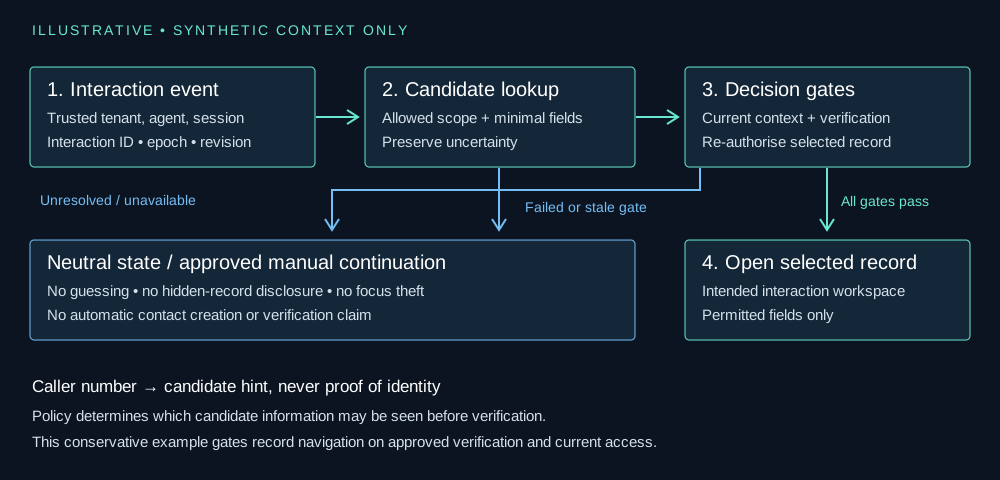
An illustrative context key contains the authenticated tenant, current agent principal and session, interaction ID, lifecycle epoch and lookup revision. The tenant and access scope must come from trusted session/server context, not a caller-supplied field or unchecked URL parameter. An epoch changes when the lifecycle invalidates the old context; a lookup revision changes when a new lookup supersedes an earlier request.
event -> validate documented interaction context
      -> derive trusted tenant / principal / session scope
      -> parse permitted lookup input, or choose manual path
      -> request only policy-permitted candidate fields
response -> verify interaction + epoch + lookup revision are current
         -> otherwise discard; never navigate the focused tab
selection -> approved verification decision for this interaction
          -> re-authorise selected record and permitted fields
          -> recheck active context immediately before navigation
          -> open only in the intended interaction workspace
any failed gate -> neutral state / approved manual continuation
Cancellation is useful but not sufficient: a cancelled request may still finish. Apply the context checks when processing its result and again before changing the workspace. Verification and record selection must also be scoped to the interaction and caller role; do not carry a previous call's verified flag into the next call.
Make zero, one and multiple matches explicit
| Lookup outcome | Safe continuation | Do not infer |
|---|---|---|
| No usable caller identity | Keep a neutral workspace and offer the approved manual verification/lookup path. | An empty number belongs to a CRM record with no stored phone. |
| No permitted candidates | Say that automatic lookup did not identify a record; continue without exposing hidden records. | The caller is a new customer or has no account anywhere. |
| One permitted candidate | Treat it as a candidate; apply the approved verification and access gates before navigation. | The caller has been authenticated by the number match. |
| Multiple permitted candidates | Preserve ambiguity and use an approved selection/verification workflow with minimal allowed information. | The first, newest or highest-scoring result is correct. |
| Too many or truncated results | Mark the lookup unresolved and use an approved, scoped way to narrow it. | The returned page is a complete or uniquely matching set. |
| Timeout, permission failure or invalid response | Show an unavailable/unresolved state and allow safe manual continuation. | A technical failure means no matching customer exists. |
Manual fallback is not an authorisation bypass. Do not read a list of possible customer names aloud, expose addresses to disambiguate, or ask an agent to use a more privileged account. Use the organisation's existing approved verification process and permitted search fields. If policy does not permit a useful candidate preview, the fallback should remain generic.
Provide a clear way to reject the suggestion, change an incorrect selection or continue without an identified customer where the workflow permits it. Do not automatically create a contact, merge records or attach an interaction merely because a lookup failed. Such writes need a separately specified and authorised workflow.
Check current API behaviour and permission defaults
Salesforce's Lightning Open CTI searchAndScreenPop documentation provides a useful boundary example. It searches objects defined by the softphone layout and normally performs navigation immediately; deferred: true postpones that navigation and returns SCREEN_POP_DATA for a later screenPop call, passed unmodified. Deferring navigation creates a decision point—it does not authenticate a caller, impose your privacy policy or make a stale response safe. [4]
The same document warns that the returned matches follow softphone layout settings but the search page that opens can show matches beyond the objects specified in that layout. Inspect both the response fields and the eventual destination under the real agent's permissions. A layout filter is not a substitute for access control, and deferred navigation does not by itself prevent sensitive fields from already reaching the browser. [4]
If a custom Salesforce lookup uses Apex, record sharing and object/field permissions require separate attention. The current Secure Apex Classes guide distinguishes user-mode defaults in API 67.0 and later from system-mode defaults in API 66.0 and earlier, and recommends explicit access modes for maintainability. It also explains that with sharing concerns record-level security, not object- and field-level security by itself. Inspect the compiled API version, explicit modes, overrides and every returned field rather than relying on a remembered default. Do not return privileged service-account results to an agent without enforcing the intended access boundary. [5]
These Open CTI details are relevant when evaluating existing Lightning integrations, not a recommendation for a new long-term Open CTI architecture. Salesforce now states that Open CTI is in maintenance mode with retirement scheduled for February 2028, is unavailable for newly created Agentforce Service orgs, and recommends transitioning development towards Salesforce Voice. Confirm the supported path and migration implications for the actual environment. This guide does not establish compatibility with a specific connector, org or Voice implementation. [6]
Reject stale responses and keep concurrent interactions separate
Asynchronous lookup can finish after the agent has accepted another interaction, transferred the first call, selected a different record or signed out. Store state per interaction rather than in a global currentCustomer variable. A background result may update its own still-valid interaction state if policy permits, but it must not steal focus or navigate another interaction's tab.
| Trace | What changes | Required result |
|---|---|---|
| SYN-I01 lookup finishes while SYN-I02 is focused | The receiving workspace no longer matches the requested interaction. | Do not open SYN-I01's candidate in SYN-I02 or switch focus automatically. |
| Lookup revision 2 finishes before revision 1 for SYN-I01 | The earlier request is superseded. | Keep revision 2; discard revision 1 even if its response is successful. |
| SYN-I01 transfers to another agent | The old ownership/lifecycle scope is invalidated. | Invalidate the old agent's automatic navigation and require current authorisation in the receiving context. |
| Agent signs out and signs in again | The principal/session scope has changed, even on the same device. | Discard prior-session callbacks and any inherited verification or selection state. |
| Manual selection changes before lookup completes | The agent has made a newer context decision. | Do not silently replace it; invalidate or explicitly reconcile the old suggestion. |
| Permission is revoked after candidates are found | A previously visible record is no longer authorised. | Deny final access without leaking the record through a cached preview or fallback path. |
Define the lifecycle states that permit a pop in your workflow, including whether wrap-up is eligible. Reset sensitive previews on the relevant transition and scope caches to tenant, principal/session, interaction and access policy. Browser tabs and components can survive a call; their continued existence is not evidence that the old context is still valid.
An acceptance checklist for the integration and privacy reviewers
Run these cases against synthetic records in an approved sandbox, with restricted agent roles as well as administrators. The checklist defines expected safety properties for review; it is not a claim that a live CRM or connector has passed them. Confirm vendor-specific event names, identifier lifetimes and permissions separately.
- Formatting/context: supported national and international forms behave consistently under a known region; unknown context and malformed input do not trigger broad searches. Reserved drama values are not asserted to pass production number validation.
- Shared/duplicate numbers: SYN-A01 and SYN-A02 remain ambiguous; neither ordering nor recency selects a customer or merges the records.
- Negative access: SYN-A03 and SYN-B01 never appear as rows, names, counts, tooltips, logs or browser payload fields visible to the unauthorised agent.
- Single visible candidate: SYN-A04 does not produce an authenticated or verified state solely because its number matched.
- Missing identity: withheld, absent and invalid signals use the manual path; no empty-string search returns SYN-A05 or all CRM records.
- Uncertain verification: a failed or incomplete approved verification decision blocks the gated navigation and disclosure actions.
- Unavailable API: timeout, rate-limit, expired credentials and malformed/truncated results remain unresolved—not no-match—and preserve safe manual continuation.
- Response race: revision 1 arriving after revision 2 cannot overwrite the later lookup or a newer manual selection.
- Concurrency/lifecycle: another interaction gaining focus, transfer, end-state and sign-out invalidate the appropriate navigation context.
- Permission change: access is checked again on record selection/fetch; a stale preview or cached service response cannot bypass revocation.
- Destination behaviour: inspect the actual popped page, returned fields and search results under restricted roles, not just the lookup callback.
- Accessible fallback: a keyboard user can identify the active interaction, review only permitted suggestions, reject a suggestion and continue without automatic focus theft.
Keep the handover and diagnostic context minimal
Pass only the identifiers and state needed by the receiving component, with provenance and current authorisation checked at the boundary. Do not copy full customer profiles or call transcripts into telephony attributes, query strings or generic diagnostics. Caller numbers, search terms, candidate IDs and verification results can themselves be sensitive; approve any operational logging and retention with the responsible owners.
Useful synthetic diagnostics distinguish missing input, unresolved ambiguity, denied access, unavailable lookup and stale-context rejection without exposing real customer content. A no-match counter is not a reason to weaken authorisation or auto-open a best guess. Use a reviewable decision record: which signals are permitted, what each state means, what the agent sees, and which team owns a safe correction.
The objective is not perfect recognition. It is a workflow in which uncertain identity remains uncertain, unauthorised data stays protected, and the agent can continue without attaching the wrong person to the wrong interaction.
Limitations
This is an illustrative design guide, not a deployed icommunix matching algorithm, customer case study, legal prescription or guarantee of correct identification. Every record, tenant, interaction and trace below is synthetic. Phone examples use Ofcom's drama range; canonical-style keys illustrate comparison only and do not establish allocation, reachability or acceptance by a phone-validation library. The conservative example gates record navigation on an approved verification decision; your privacy/security owners must define permitted pre-verification views and disclosure rules. Documentation was checked on 30 October 2026 and must be rechecked for the actual API version, permissions and platform lifecycle before implementation.
References
- [1] Ofcom — Types of scam calls, texts and messages: number spoofingAccessed
- [2] Google libphonenumber — FAQ: parsing, national prefixes and number-validation limitsAccessed
- [3] Ofcom — Telephone numbers for use in TV and radio drama programmesAccessed
- [4] Salesforce — searchAndScreenPop() for Lightning ExperienceAccessed
- [5] Salesforce — Secure Apex Classes: record sharing, object/field permissions and API-version defaultsAccessed
- [6] Salesforce — Get Started with Open CTI, including its lifecycle noticeAccessed
Resources
Need to design customer lookup around an existing CRM?
Discuss your identity and workflow constraints with our engineering team. Share a non-sensitive outline of your platforms, permissions and fallback requirements—not customer records, caller numbers, recordings or credentials.