
Extending an agent workspace: embedded application or custom desktop?
Compare embedded extensions, workspace SDKs and custom agent desktops through workflow ownership, identity, contact context, permissions, accessibility and recovery.
- Published
The short answer
Choose the smallest supported integration surface that can meet the agent's workflow and its permission, context and recovery requirements. An embedded extension can keep platform-owned controls in place; a documented workspace SDK adds only the events and actions that the host exposes and grants. A custom desktop gives your team more responsibility for navigation, lifecycle, accessibility and upgrades, even when it embeds supported platform components. Embedding, SDK integration and desktop ownership are related design choices—not three mutually exclusive products. None removes the need for app authentication, server-side authorisation or safe handling of stale contact context.
Start with the work the agent needs to complete
A single screen is not automatically a coherent workspace. An agent may need to manage the current interaction, inspect permitted customer context, follow a task, record an outcome and recover from an unavailable dependency. The architecture question is which system should own each step and what happens when its context changes—not simply how many applications fit into a frame.
- Map the role, interaction/channel and task: what information and actions are required, optional or prohibited?
- Identify the authoritative owner of interaction state, customer records, workflow decisions and human-entered data.
- Distinguish contact-level work from session-level tools that genuinely span several contacts.
- Define the fallback if a frame, host bridge, sign-in, lookup or write fails while the agent is working.
- Assign responsibility for browser support, accessibility, upgrades, incident triage and the eventual handover of the application.
Prototype the critical sequence with representative users before choosing a larger build. A bounded extension may meet the requirement without replacing the desktop. Conversely, forcing a cross-application workflow into an unsuitable extension surface can leave the agent responsible for reconciling inconsistent state manually. These are design trade-offs, not claims that either option always reduces handling time.
Separate placement, integration contract and desktop ownership
Embedding describes where an application appears. An SDK defines a documented communication surface. Desktop ownership defines who controls the overall experience and its lifecycle. An embedded app may use a workspace SDK; a custom desktop may still embed platform-owned components and use supported APIs. Treating these as independent decisions makes the comparison more useful.
| Approach | Useful when | Your responsibility | Boundary to verify |
|---|---|---|---|
| Host-supported link or embedded view with limited context | A bounded reference/task view can work without broad host events or control. | Application sign-in, readable states, permitted data access and navigation back to the agent's work. | The host permits that embedding/navigation; the destination permits framing and its auth flow works. This is not an exception to a specific platform's SDK requirements. |
| SDK-aware extension inside a platform-owned workspace | The host's supported events, contact scope and actions cover the required workflow. | App lifecycle, scoped state, event cleanup, backend authorisation, app UI and safe fallback. | Only documented and granted capabilities are available. An SDK does not expose every internal host feature. |
| Custom agent desktop using supported platform components/APIs | Workflow ownership, layout or interaction across systems cannot be met within supported host extensions. | Overall shell, context/navigation, component lifecycle, browser/media requirements, accessibility, upgrades and failure boundaries. | Exact supported components, SDK versions, permissions, channel behaviour and platform-hosting restrictions. A custom shell does not automatically reproduce every first-party feature. |
A generic iframe is not a supported shortcut into every CRM or contact-centre UI. For the AWS third-party workspace pattern discussed below, the documented app is an HTTPS website that supports embedding, and the SDK provides communication with the host. Assess the platform's actual registration and integration contract rather than pasting a product URL into an iframe and assuming it will work. [2]
Draw the trust and context boundaries
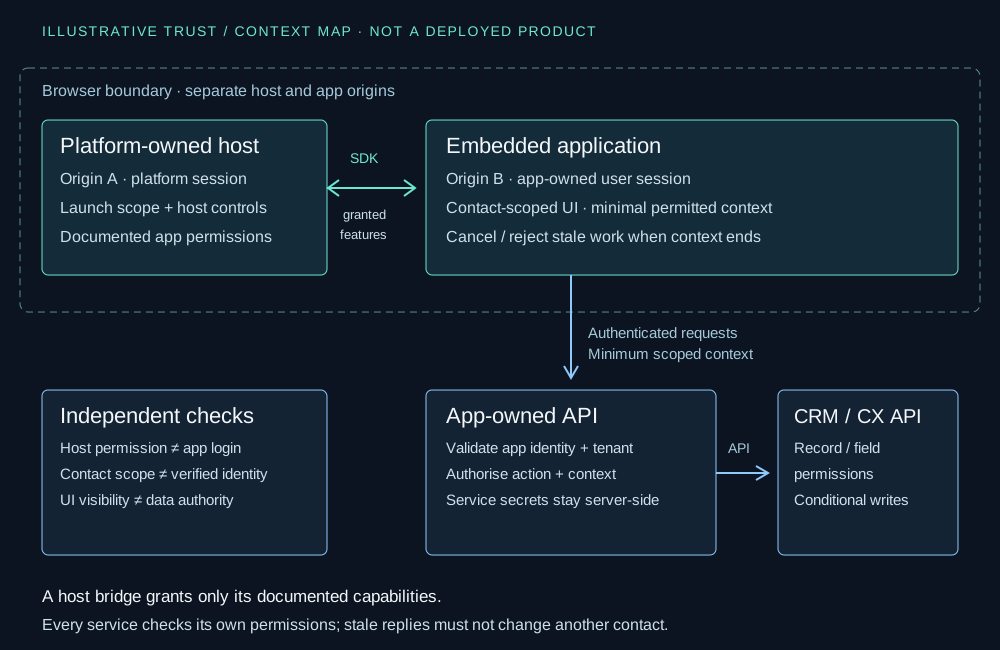
Read the diagram as four separate checks: permission to launch or communicate with the host; authentication to the application; authorisation for a particular app operation and tenant; and permission to access the target CRM record or field. Passing one check does not satisfy the others. A context identifier is an input to an authorised operation, not a credential or proof of a customer's identity.
Keep service credentials out of browser bundles and general diagnostic messages. Derive trusted identity and tenant context from verified sessions or grants, validate the requested operation server-side, and minimise the context sent between components. Do not forward an entire contact payload to a CRM simply because the host can provide it.
Review permitted embedding origins, browser framing controls, messaging boundaries and the authentication flow together. Prefer the documented SDK bridge for supported host communication rather than inventing an unauthenticated cross-window message protocol. If custom messaging is unavoidable, validate its origin, source and schema under an explicit security design; an iframe alone does not make an integration trusted.
A version-checked AWS workspace example
For readers researching Amazon Connect third party apps, the current official pages use Connect Customer agent workspace naming. The example below follows those current pages, not an inferred change to icommunix's historical work. AWS describes hosting third-party applications alongside first-party workspace tools. That documentation establishes an integration surface, not a partnership or proof that icommunix has delivered every pattern. [1]
The version check on 30 October 2026 identified @amazon-connect/app 1.0.14 in the public npm registry. Its published metadata references @amazon-connect/core and @amazon-connect/workspace-types 1.0.14. Inspection of the release declarations confirmed AmazonConnectApp.init, create/destroy callbacks and an optional context scope. The declarations prefer instanceId and scope over deprecated appInstanceId and contactScope properties; copied snippets must be reviewed against the chosen release. This checks a published package surface, not compatibility with every host configuration or every optional SDK module. [7]
| Check | Current documented behaviour | Illustrative decision |
|---|---|---|
| Host handshake | AmazonConnectApp.init establishes the workspace connection and accepts onCreate/onDestroy callbacks; keep the provider for SDK clients. Direct standalone loading does not establish that host connection. [3] | Distinguish host-connected readiness from the page merely loading. Show a neutral unavailable state rather than simulated customer content. |
| Contact scope | The current guide recommends Per contact for contact-specific content. Separate instances are bound to individual contacts; hidden instances retain state when contacts are switched. [4] | Use the instance's actual startup scope, not a global last-contact variable; do not treat hidden as destroyed. |
| Idle startup | A per-contact app can start without an active contact. Idle scope cannot access contact data and contact operations fail authorisation. [4] | Render a meaningful empty state; do not fall back to the last customer's record. |
| Cross-contact content | A shared cross-contact instance receives multiple contacts' events, and the guide says it receives no event when the agent switches contacts. [4] | Do not use this as a substitute for per-contact display binding. Reserve genuinely session-level behaviour for an explicitly reviewed design. |
| Scope versus grants | Scope does not itself grant contact-data access; corresponding permissions must be granted for events/requests. Host launch-time scope can affect the resulting scope. [4] | Read actual scope and handle denied operations; do not infer permission from registration, visibility or a cached assumption. |
| Application sign-in | The app must provide its own authentication; AWS recommends the same identity provider as the instance where appropriate for SSO. [5] | Confirm app user identity and backend authority separately from the platform session. |
| Destroy | The scope guide says AppManager waits five seconds for destroy handling, then destroys the instance; the app is not displayed during that callback. [4] | Keep cleanup prompt, reject late results and persist permitted work at appropriate confirmed boundaries—not only at destruction. |
Do not copy the registration default into application logic as a permanent truth. The current scope guide describes launch-time overrides and inherited scope in nested launches. Verify the actual startup context and current host contract. Also verify every additional module's exact release and required permissions before using contact or agent requests; the app-module check above does not pin them. [4][6]
Bind asynchronous work to the correct instance and contact
Maintain an explicit lifecycle state: loading, host ready, app authenticated, scope known, permitted data ready, and ended or unavailable. These may resolve in different orders. A host handshake does not establish that the CRM is reachable, and an authenticated app session does not make a contact-scoped request valid while idle.
Correlate each lookup or action with the app instance, authenticated session/tenant, bound contact and request generation. Before applying a response, confirm that its operation is still relevant and permitted. Cancellation is useful resource cleanup but is not sufficient by itself; a completed request may still deliver an obsolete result.
Subscribe and unsubscribe using the supported lifecycle/API contract. Avoid accumulating handlers on re-renders or re-initialisation. A hidden contact instance may continue to exist; decide which nonessential work to suspend without losing its legitimate state. On destruction or sign-out, invalidate pending work, release owned resources and clear access to contact data.
Browser storage may be shared by instances or tabs even where in-frame JavaScript state is separate. If storage is approved at all, scope keys to the necessary tenant, user/session and contact boundary, and define expiry and deletion. A contact ID alone is not an access control. Do not invent browser retention of sensitive notes as a convenient fallback.
Walk through an explicitly synthetic context sequence
Use the following invented sequence as a review fixture, not a report of a live test. SYN-CONTACT-A and SYN-CONTACT-B are separate contacts in one hypothetical authorised agent session. Each has a per-contact instance. A later approved sandbox exercise must reproduce these transitions with the selected SDK and host configuration; this guide does not call a contact-centre service or build the app.
| Step | Stimulus | Required app behaviour |
|---|---|---|
| 1 | Open an instance with idle scope before any contact. | Show a meaningful empty state; make no contact-data request and reveal no previous record. |
| 2 | Launch instance A bound to SYN-CONTACT-A and request permitted context. | Bind the request to A's current session, scope and generation; show pending, not a fabricated customer. |
| 3 | Launch/select instance B for SYN-CONTACT-B while A's request is pending. | B displays only B's authorised context. A remains a separate hidden instance; switching does not imply A was destroyed. |
| 4 | A's delayed response arrives while B is visible. | If still valid, update A only. It must not change B's record, steal focus or navigate B. |
| 5 | A ends or its app session is invalidated before another response. | Invalidate A's pending work; discard the late result and complete cleanup without a last-second save guarantee. |
| 6 | A target request is denied or its permission is revoked. | Do not reuse a broader identity or cached data to bypass denial; provide an authorised fallback and accurate state. |
This fixture checks lifecycle and display isolation, not customer identity matching or reliable CRM writeback. Those require their own explicit acceptance cases. It assumes no confidential customer record and gives no evidence that a particular live configuration passes.
Know what a custom desktop adds to your responsibilities
A custom desktop can still use supported platform components. AWS documents Connect Customer Streams as a library for integrating the Contact Control Panel and handling agent/contact state, and describes AppManager for discovering, launching and managing AWS managed applications. Its integration sequence includes a host-managed iframe and secure communication. This is a documented composition path—not permission to copy internal platform APIs or an assertion that all first-party features are interchangeable. [8]
If your team owns the shell, it also owns decisions about layout, focus, context switching, component startup/teardown and coherent failure states. Establish who verifies media/device behaviour, browser policies, authentication and platform feature changes. Confirm the exact supported SDK and component combinations rather than assuming the app package, Streams and every workspace feature share a single compatibility version.
Define a clear support boundary between platform-controlled components and your custom code. Capture a minimal, permission-safe reproduction of an issue without exposing a real customer's data. Keep a supported route for the agent to continue where the workflow permits it; adding another layer should not make failure ownership ambiguous.
Design accessibility and fallback across the whole workflow
- Keyboard and focus: provide a predictable way into and out of embedded content; avoid traps and late navigation that moves focus to a different contact.
- Meaning and status: use descriptive frame/page names, headings and accessible loading, denied, empty and failure messages; do not rely on colour alone.
- Responsive use: check zoom, narrow application panels, text wrapping and controls without hiding essential actions.
- Assistive technology: test the combined host and app sequence, including context changes and asynchronous status announcements, not only the app in a standalone tab.
- Fallback: say whether the host, application or target system is unavailable, and offer only an approved continuation that preserves access boundaries.
- Authentication: test expired app sessions, sign-out and browser cookie/storage restrictions in the supported browser estate, not only a successful initial SSO path.
AWS's authentication guide warns that embedded cookie-based authentication can be affected by browser restrictions. Its dated browser-policy discussion is not a current compatibility guarantee for your users: test the actual managed-browser settings and approved sign-in approach. Do not make disabling browser protections the default design. [5]
Define how incomplete human input is handled before a contact or frame ends. A destroy callback may be too late to prompt or persist it. If the workflow cannot confirm a save, label it accurately; never promise that a local copy exists without implementing and approving its storage, access and recovery behaviour.
Make upgrade and acceptance ownership part of the decision
Record the chosen host surface, SDK modules and exact versions, documented capabilities, grants, app scope, authentication design and browser assumptions. Assign an owner to review release notes and recheck changed contracts. A sample from a current documentation page is not proof that every installed package exposes the same fields.
- Demonstrate the complete agent task using synthetic data in a separately approved environment, including idle startup and contact switching.
- Verify app authentication, least-privilege host grants, server-side tenant checks and target record/field access independently.
- Exercise simultaneous contacts/tabs, stale responses, hidden instances, destroy, sign-out and permission changes.
- Test dependency outage, denied requests, lost save confirmation and an approved manual continuation with clear ownership.
- Review keyboard, focus, status announcements, panel sizes and assistive-technology behaviour across host/app boundaries.
- Repeat the critical cases for the proposed upgrade and confirm a supported recovery/rollback path before release.
Choose a custom desktop only where its additional ownership is justified by requirements that supported extensions cannot meet adequately. Keep platform-owned controls where they satisfy the workflow. The engineering decision is about explicit boundaries and maintainable responsibility—not claiming that more custom UI is always better.
Limitations
This original architecture guide is illustrative, not a deployed icommunix workspace, third-party product screenshot, vendor partnership claim or compatibility certification. The static diagram and named contact examples are synthetic. AWS documentation and the published @amazon-connect/app 1.0.14 package metadata/declarations were checked on 30 October 2026; this is not a live sandbox test or a pin of every SDK package. Verify the exact host, SDK modules, browser policies, instance configuration, supported capabilities and permissions before implementation. No universal channel coverage, accessibility conformance, delivery improvement or production outcome is asserted.
References
- [1] AWS — Working with third-party applications in the Connect Customer agent workspaceAccessed
- [2] AWS — Create your application: HTTPS, iframe embedding and SDK communicationAccessed
- [3] AWS — Initialize the SDK: provider, create/destroy lifecycle and host handshakeAccessed
- [4] AWS — Application scoping: per-contact, cross-contact, idle and launch-time scopeAccessed
- [5] AWS — Application authentication: app-owned sign-in and embedded cookie considerationsAccessed
- [6] AWS — Events and requests in the agent workspaceAccessed
- [7] npm registry — published @amazon-connect/app 1.0.14 metadata and release artifactAccessed
- [8] AWS — Integrating AWS managed applications with Connect Customer Streams and AppManagerAccessed
Resources
Planning a workspace extension or a custom agent application?
Talk through your integration surfaces, user workflows and operating constraints with our team. Share a non-sensitive outline of the platforms and decisions involved—not customer records, screenshots containing personal data or credentials.